

It Starts With a Single Prompt
The whole workspace was created from this:
“Setup a workspace to check the surf report for the San Diego area every 30 minutes. Only notify me if there are good surf conditions. Any beach in a 20 mile area is fine.”
Friday handled the rest — creating the workspace, figuring out the right signal provider, wiring the agents, and publishing the config. Here’s what it built.
The Architecture
A cron signal fires every 30 minutes
A web agent (
surf-checker) scrapes Surfline and Magic Seaweed for conditions across ~10 San Diego beaches from Ocean Beach up to OceansideAn LLM evaluator (
surf-evaluator) applies real surf criteria and decides whether to alert — no spam, no noiseA memory write surfaces the alert in the Friday workspace chat when conditions are good
How Friday Wired the Cron Signal
Friday discovered during setup that the signal provider isn’t called cron — it’s schedule. This is the kind of thing that would cost you 20 minutes hunting docs. Friday found the right schema by probing the API directly and self-correcting:
Fires every 30 minutes. Done.
The Surf Checker Agent
This is a type: atlas agent wrapping Friday’s built-in web bundled agent. Friday wrote the prompt itself from the original request:
Search for current surf conditions at San Diego area beaches within a 20-mile radius. Check Surfline, Magic Seaweed, or similar surf forecast sites. Look at beaches including: Ocean Beach, Mission Beach, Pacific Beach, La Jolla Shores, Del Mar, Solana Beach, Encinitas (Swamis), Carlsbad, and Oceanside. For each beach with notable conditions, extract: wave height, wave period, wind speed and direction, swell direction, and current tide.
The agent opens a real browser, reads the live forecast sites, and returns a structured summary. No API keys needed for Surfline — it just reads the page.
The Evaluator Agent (the Smart Part)
This is where most surf alert systems fall apart. They either spam you with 1-foot junk or require you to tune a dozen thresholds. Friday wrote the surf-evaluator as an llm agent with a clear, explicit rubric derived from “good surf conditions”:
Good conditions (trigger alert):
Wave height 3 ft or larger
Wave period 8 seconds or longer (cleaner, more powerful waves)
Wind offshore or light (under 10 mph)
Swell from NW, W, or SW — the good angles for San Diego beaches
Poor conditions (stay quiet):
Under 2 feet
Choppy onshore wind above 15 mph
Short-period wind swell under 7 seconds
If conditions are good at any beach, it writes a SURF ALERT to long-term memory with the beach name, stats, and a one-sentence recommendation. If conditions are poor, it logs a quiet one-liner to the notes store and moves on.
What a Surf Alert Looks Like
When conditions meet the threshold, the evaluator writes something like:
SURF ALERT: Swamis (Encinitas) looking clean — 4–5 ft @ 12s, NW swell, light offshore wind under 8 mph. Head out before 10am before the sea breeze kicks in.
When conditions are poor, you get nothing. That silence is the feature.
One Thing to Know About Notifications
Wire a Telegram communicator and the alerts land directly in your phone. Here’s what an actual alert looks like:
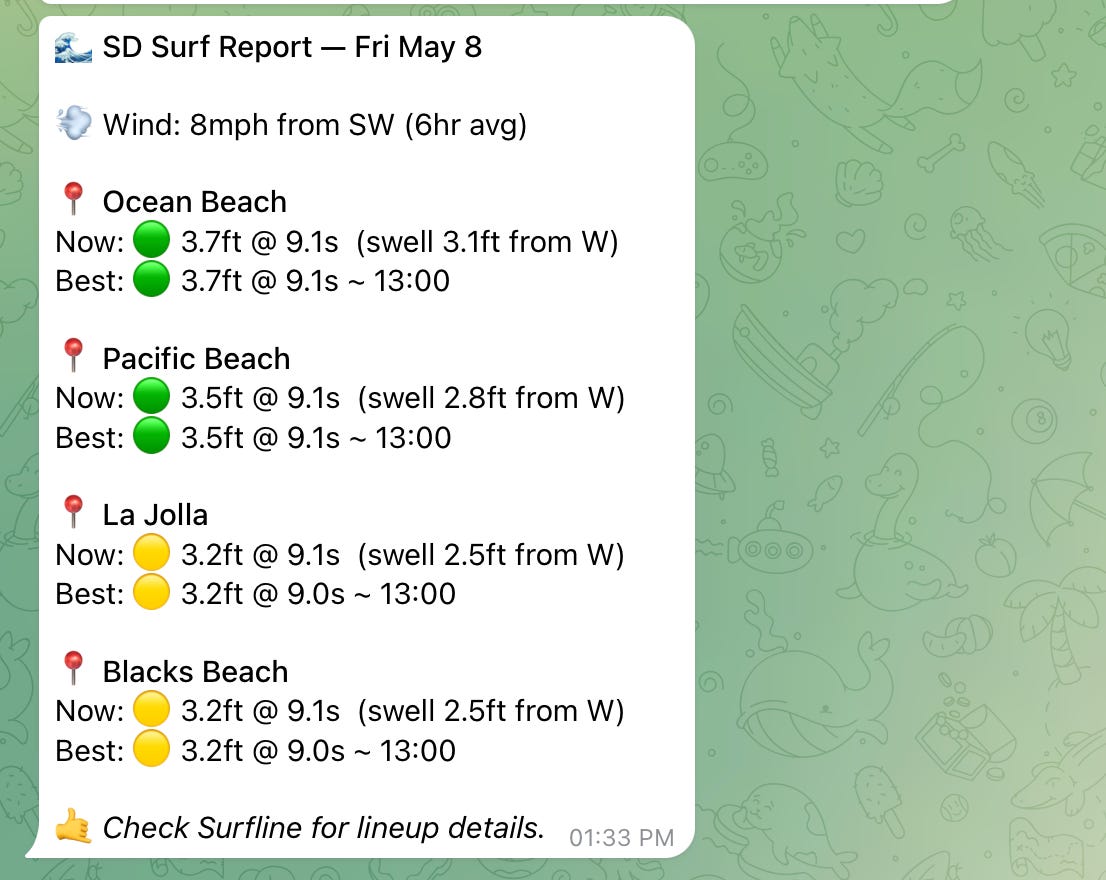
Four beaches, current conditions, best window, and a link to Surfline — all from a single scheduled job.
Why This Works Well
Judgment belongs in the agent, not the config. Rather than encoding “good surf” as a brittle rule in a scheduler, the criteria are described in plain English and evaluated by an LLM on each run. It understands context — 3 ft at 6 seconds feels worse than 2 ft at 12 seconds.
Real browser access. Surf forecast sites are JavaScript-heavy. The web agent runs a real browser, so it reads Surfline exactly as a human would — no scraping brittle HTML, no API fees.
Signal-first design. The cron signal is the clock. The job is the logic. Changing the schedule is a one-line edit. Adding a second job that texts instead of logging memory is additive, not a rewrite.
The Full Workspace YAML
This is the shareable config that Friday generated from the chat — you can drop this into any Friday instance to recreate the workspace exactly:
version: ‘1.0’
workspace:
  name: San Diego Surf Watch
  description: Monitors San Diego area surf conditions every 30 minutes and notifies when conditions are good.
signals:
surf-check-cron:
provider: schedule
description: Fires every 30 minutes to check San Diego surf conditions
config:
schedule: “*/30 * * * *”agents:
surf-checker:
type: atlas
agent: web
description: Fetches current surf conditions for San Diego area beaches within 20 miles
prompt: >-
Search for current surf conditions at San Diego area beaches within a
20-mile radius. Check Surfline, Magic Seaweed, or similar surf forecast
sites. Look at beaches including: Ocean Beach, Mission Beach, Pacific
Beach, La Jolla Shores, Del Mar, Solana Beach, Encinitas (Swamis),
Carlsbad, and Oceanside. For each beach with notable conditions, extract:
wave height, wave period, wind speed and direction, swell direction, and
current tide. Return a structured summary. Focus on accuracy. surf-evaluator:
type: llm
description: Evaluates surf conditions and saves a surf alert to memory if conditions are good
config:
provider: anthropic
model: claude-sonnet-4-5
prompt: >-
You are a surf conditions analyst for San Diego.
Evaluate the surf report. Good conditions: 3ft+, 8s+ period, light/offshore wind, NW/W/SW swell.
If good: call save_memory_entry (memoryName=”memory”) with a SURF ALERT.
If poor: call save_memory_entry (memoryName=”notes”) with a one-line log.
Always call save_memory_entry exactly once.jobs:
surf-watch:
description: Checks San Diego surf conditions every 30 min and notifies if surf is good
triggers:
- signal: surf-check-cron
execution:
agents:
- surf-checker
- surf-evaluatormemory:
own:
- name: notes
type: short_term
strategy: narrative
- name: memory
type: long_term
strategy: narrativeTry It Yourself
The setup above works for any location. Swap out the beach list and surf criteria for your local break. The same pattern — schedule signal → web scraper → LLM evaluator → memory alert — works for weather windows, tide charts, or any real-world condition you want to monitor without babysitting a dashboard.
Download Friday Studio free at hellofriday.ai or browse the source on GitHub.
