

If you’ve spent enough time with an AI coding tool, you’ve noticed it has a default mode: Helpful. Agreeable. Thorough to the point of over-engineering. It’ll write the code, draft the email, answer the question, but always through the same lens.
But the promise of AI has always been the ability to do at scale the personal touches, that inherit and understand the context of the larger work the task you’ve asked of it sits in.
Skills helped bring that promise to life.
What’s a Skill, Exactly?
A skill is a reusable set of instructions you install into an AI agent to give it a specific capability or way of working. skills.sh, an “open agent skills ecosystem,” defines it as:
“Reusable capabilities for AI agents. Install them with a single command to enhance your agents with access to procedural knowledge.”
Under the hood, each skill is a SKILL.md file: a markdown document containing workflows, behavioral rules, best practices, or tool references. You install one with a single CLI command, and it’s active for that agent from that point on.
The key thing: skills are agent-agnostic. They work across Claude Code, Cursor, GitHub Copilot, Codex, Windsurf, Gemini, and 15+ others. Skills are not inherently tool-specific; you get to encode a way of working that any compatible agent can pick up and follow.
Over the last year, we’ve spent a ton of time working and building with AI, and we’ve accumulated a few favorites. Here are the ones that our team is using time and again.
1. Brainstorming — for getting a real sparring partner
skills.sh/obra/superpowers/brainstorming
This is the one that gets referenced in our team chat the most.
By default, most AI assistants are optimized to be helpful, which usually means they agree with you, fill in the blanks charitably, and move toward execution fast. That’s great when you know what you want. It’s less great when you’re still figuring it out.
This skill flips the dynamic. It enforces a design-before-code gate: no implementation until ideas are validated, trade-offs are surfaced, and you’ve explicitly signed off. The agent asks one clarifying question at a time, presents 2–3 approaches with real trade-offs, and writes a spec doc before touching anything.
The result is a thinking partner that actually pushes back. Not a “helpful assistant” — a sparring partner.
63K weekly installs. It’s popular for a reason.
2. Karpathy Guidelines — for keeping AI code honest
skills.sh/forrestchang/andrej-karpathy-skills/karpathy-guidelines
Recommended by our cofounder Eric, and it comes up in conversations about AI coding assistants a lot.
Andrej Karpathy has been vocal about a specific frustration: LLM coding assistants over-engineer, make silent assumptions, and change things you didn’t ask them to touch. This skill is a direct response to that.
Four behavioral guardrails get baked in:
Think before coding: surface assumptions explicitly, never decide silently
Simplicity first: write the minimum viable code, nothing speculative
Surgical changes: only touch what the task requires, match existing style
Goal-driven execution: turn vague tasks into verifiable success criteria before starting
It also adds a habit of asking additional clarifying questions about code, which sounds minor until you realize how often an unasked question leads to a half-wrong implementation.
For anyone frustrated by AI’s tendency to do too much, this one’s worth installing.
3. Svelte Code Writer — for working in a framework you don’t know
skills.sh/sveltejs/ai-tools/svelte-code-writer
This one comes from a practical place: wanting an AI to produce reasonable Svelte output without having to become a Svelte expert first.
Maintained officially by the Svelte team, this skill gives the agent live access to Svelte 5 and SvelteKit documentation during your session. It can browse available docs, fetch full documentation on specific topics, and run svelte-autofixer on .svelte files before finalizing anything.
The difference between an AI guessing at a framework’s conventions and actually looking them up is significant. You get code that follows real Svelte standards rather than a confident hallucination of what those standards might be.
Especially useful if you’re moving fast in a framework that isn’t your home base.
4. Debugging — for structured bug hunts
skills.sh/supercent-io/skills-template/debugging
Debugging with an AI ad hoc can feel scattered. You paste an error, it suggests a fix, you try it, something else breaks, and the cycle repeats.
This skill brings structure to that process. It walks the agent through a 6-step debugging workflow: gather info → reproduce → isolate → root cause analysis → fix → verify and prevent regression. It covers common bug archetypes — race conditions, memory leaks, off-by-one errors — and recommends the right tool for the job depending on your language (pdb, Chrome DevTools, Delve, etc.).
The last step is the one that makes it worth it: always write a regression test. Not sometimes. Always.
Good for when you want the investigation to actually end.
How to Add a Skill to Friday AI
If you want to use one of these with Friday, just paste any URL from GitHub or skills.sh into a conversation with a little bit of context. That’s it.
It’ll read the skill, confirm what it does, and apply it going forward in that conversation. It’ll also find other conversations or workspaces that would leverage that Skill, without you having to work through a configuration file or settings page. Just tell Friday what you want to work with, for what scenarios, and it’ll go from there.
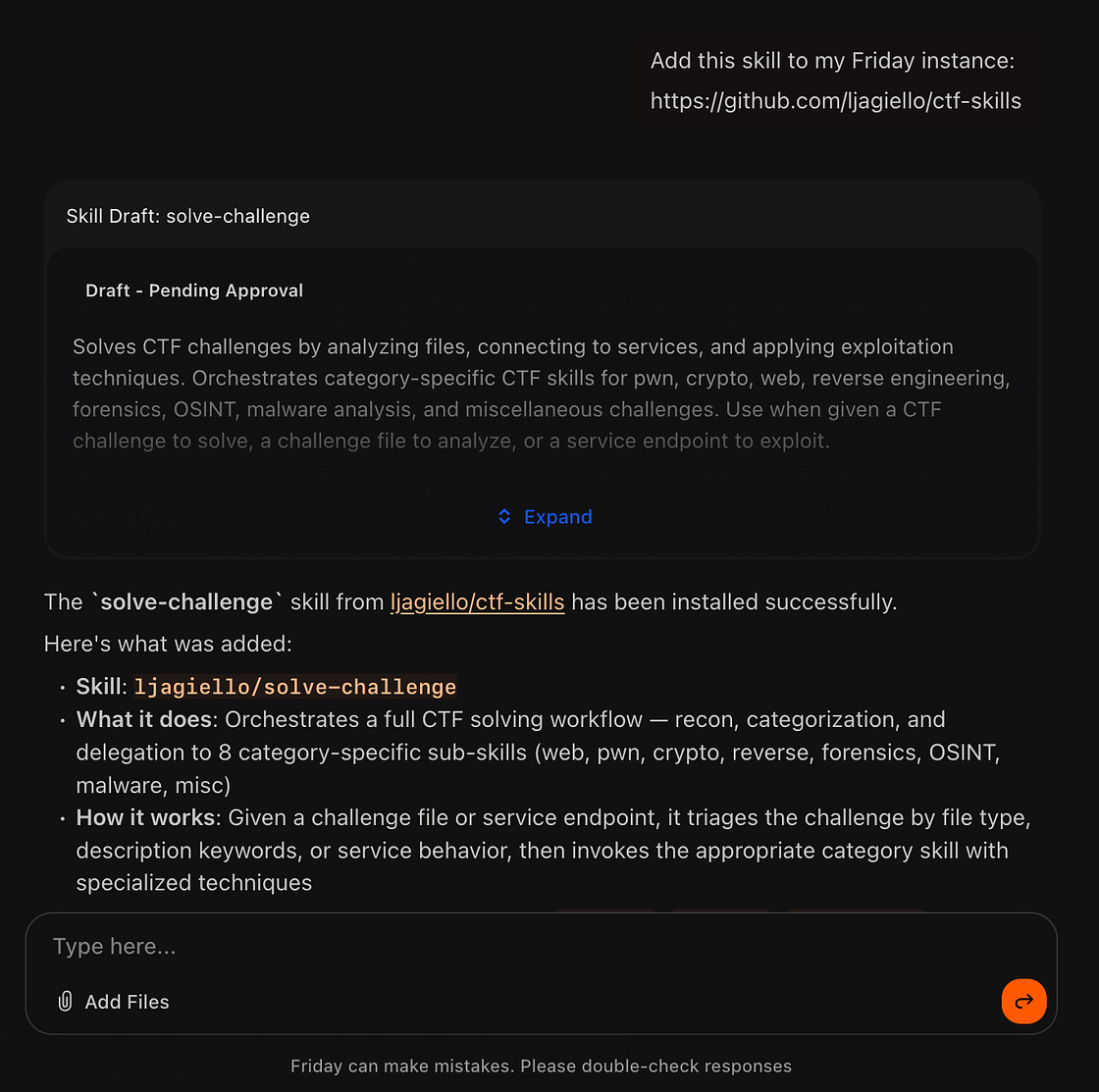
The more skills you add to Friday, the more it starts to feel like something built exactly for you. They’re an effective way to give Friday the context it needs to make every output, every draft, and every automation more refined to exactly how you work. And since adding one is just a URL paste away, there’s really no reason not to.
The goal isn’t to configure your AI once and forget it. It’s to give the right version of it to the right task, every time.
Try Friday free to start putting your skills to work.
This was article originally published on March 24, 2026 on Medium.