

Our team is two weeks out from the formal launch of Friday Studio, and we’ve already seen some of the most creative setups come from individual sellers, founders doing their own outreach, and small businesses managing their own lead gen.
Here are 6 use cases you can use as a sales professional to close more deals, keep your pipeline full, and stay top of mind to win business.
1. Keeping a Network Warm at Scale
Your best deals come from warm relationships: people who already know you, trust you, and think of you when the right moment arrives. Maintaining that across thousand-person networks is impossible to do by hand. So most people don’t, and the network goes cold.
Friday tracks a list of contacts you care about (investors, partners, past colleagues, potential clients) and monitors their public activity: LinkedIn posts, company news, funding announcements, job changes. When something relevant happens, Friday surfaces it with a short note on why it’s worth reaching out and drafts a personalized message for each trigger: congratulating someone on a promotion, referencing a post they published, following up after a conference they spoke at. The message reflects your voice because you define the tone once and Friday applies it every time.
It also runs a weekly check: who haven’t you been in touch with in 60+ days? Friday flags the list and queues draft messages. Staying in contact becomes a 20-minute review session instead of something you intend to do and never get to.
One founder we know runs this across a 3,000-person network. They spend about 15 minutes each workday reviewing and sending three messages. Before Friday, that network was largely dormant.
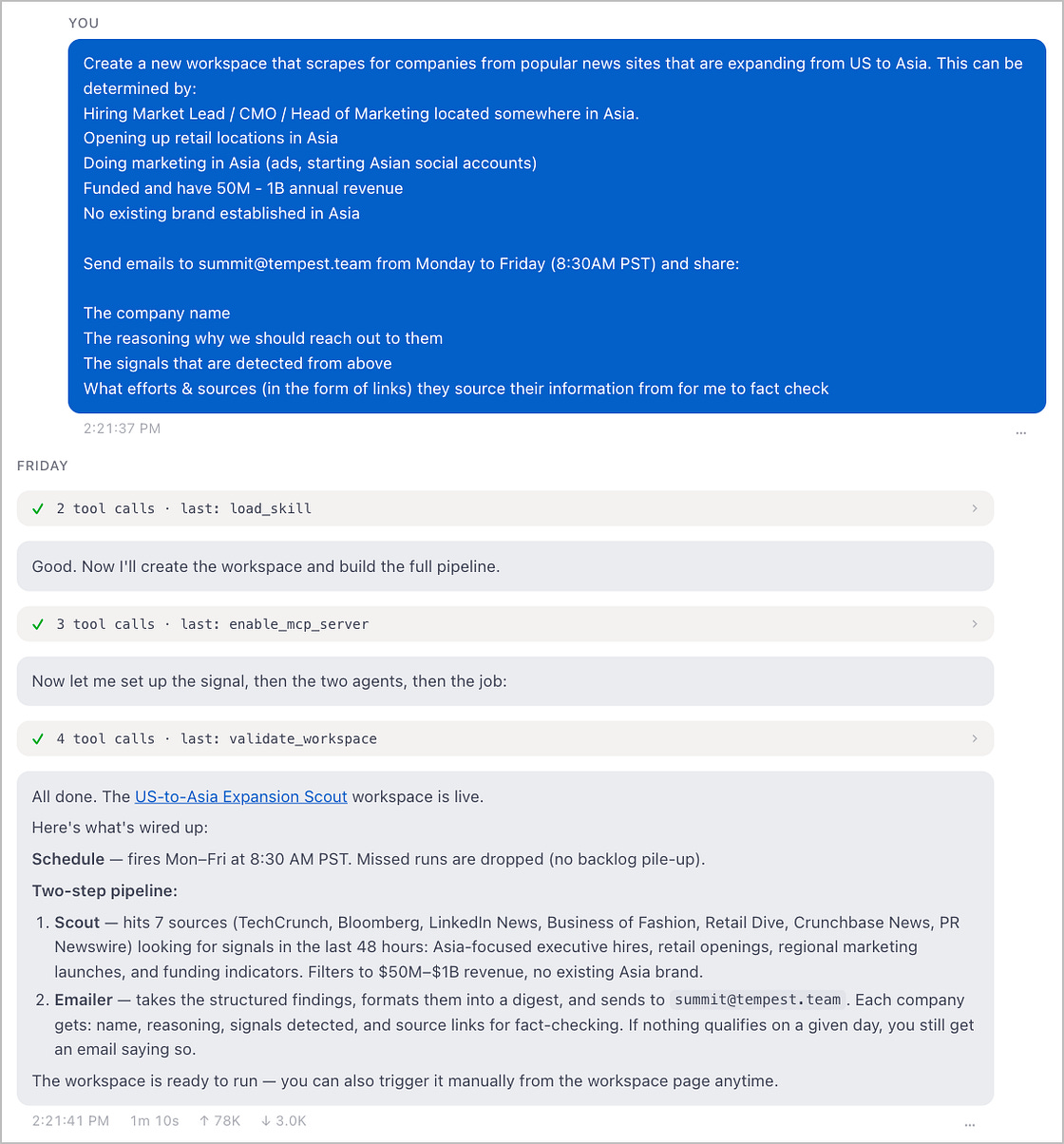
2. Sourcing Leads Against a Specific Target Profile
Finding companies that fit your ICP takes hours of Googling, LinkedIn searching, and cross-referencing. Most of the time it produces a messy spreadsheet that half the team ignores because the effort to build it wasn’t worth it.
You define the criteria: industry, company size, geography, funding stage, tech stack, headcount growth, any signal that defines a good fit. Friday searches and scrapes across public sources to build a list of matching companies, enriched with what you need: website, key contacts, recent news, and the specific signal that flagged them.
For each company, Friday drafts a first-touch message in your inbox referencing something specific (a recent hire, a funding round, a product launch) so the outreach doesn’t read like a template blast. It runs on a schedule. Every week, or at a cadence you choose, Friday adds companies that newly entered your target profile and queues them for review. Your pipeline fills with companies that fit, and the outreach goes out when the signal is fresh.
3. Deal Intelligence and CRM Hygiene
After every sales call, Friday reads the transcript (from Gong, Fireflies, or a pasted summary), extracts next steps, objections, and deal signals, and writes structured notes directly into HubSpot. No post-call data entry required.
It then monitors your pipeline daily: flags deals that haven’t moved in 7+ days, identifies at-risk accounts by scanning email threads and call notes for warning signs, and surfaces them in a Slack digest every morning. When a deal closes, Friday generates the CS handoff brief (contract details, key stakeholders, stated goals) automatically.
Reps spend less time on admin, pipeline data stays current, and customer success onboarding starts with context rather than a blank page. You also get the added benefit of a cleaner handoff between rep and account manager.
4. Pre-Call Research Briefs
A good discovery call requires knowing who you’re talking to. Most reps have five minutes between their last meeting and the next one.
The night before, or an hour before, Friday researches the company and the contacts on the call: recent funding, product changes, leadership hires, tech stack signals, and any press coverage worth referencing. It produces a one-page brief with the three most relevant talking points and the questions most likely to open the conversation. You can have it pull prior interaction history from your CRM (previous calls, email threads, notes from earlier deals), your notes app, email, or any other data source, so you get full context on who you’re speaking with.
The brief arrives in Slack or email at a scheduled time. The rep doesn’t have to trigger anything.
5. Proposal Research and Personalization
Most proposals fail to land because they’re generic. The pricing is right, the features match, but nothing in the document shows you actually understand the buyer’s situation. Friday fixes the research half of that problem.
Before you send a proposal, Friday researches the prospect’s business in depth: their current tech stack from job postings and public profiles, recent hires that signal a strategic priority, budget signals from headcount growth or funding news, and any public statements from their leadership about what they’re trying to accomplish. It then produces a one-pager of what to weave into the proposal: the specific pain points to reference, the language their team uses, the angles most likely to resonate with the person signing off. You can even connect a Google Slides MCP and have Friday build a custom deck based on your existing templates, scheduled around your meetings for the week.
6. Win/Loss Pattern Analysis
Most reps have intuitions about why deals close or die. Few can prove them. Friday reads through all the call notes, objections, and outcomes logged in HubSpot and surfaces the actual patterns: which objections correlate with closed-lost, which industries close fastest, which personas stall at procurement, which competitors keep showing up in deals that go sideways.
Run it quarterly and you get a plain-English summary of what’s working and what’s not, grounded in your own deal history rather than generic sales advice. The rep who lost three enterprise deals to the same competitor this quarter finds out before the fourth one, not at the annual review.
How to Get Started in Friday Studio
None of these require a developer or a lengthy setup. Download Friday Studio, describe what you want it to do in plain English via chat. Friday will connect the tools you already use (HubSpot, Slack, Gmail, LinkedIn), ask a few questions, and set up your workflow. Most of the workflows above take under 30 minutes to configure the first time.
Download Friday Studio free at hellofriday.ai or browse the source on GitHub.